Field Operations
ROE Check-it
ROE Check-it helps teams plan field jobs, complete checklists offline, collect evidence, and turn completed work into reports and follow-up tasks.
Direct BasalBit contribution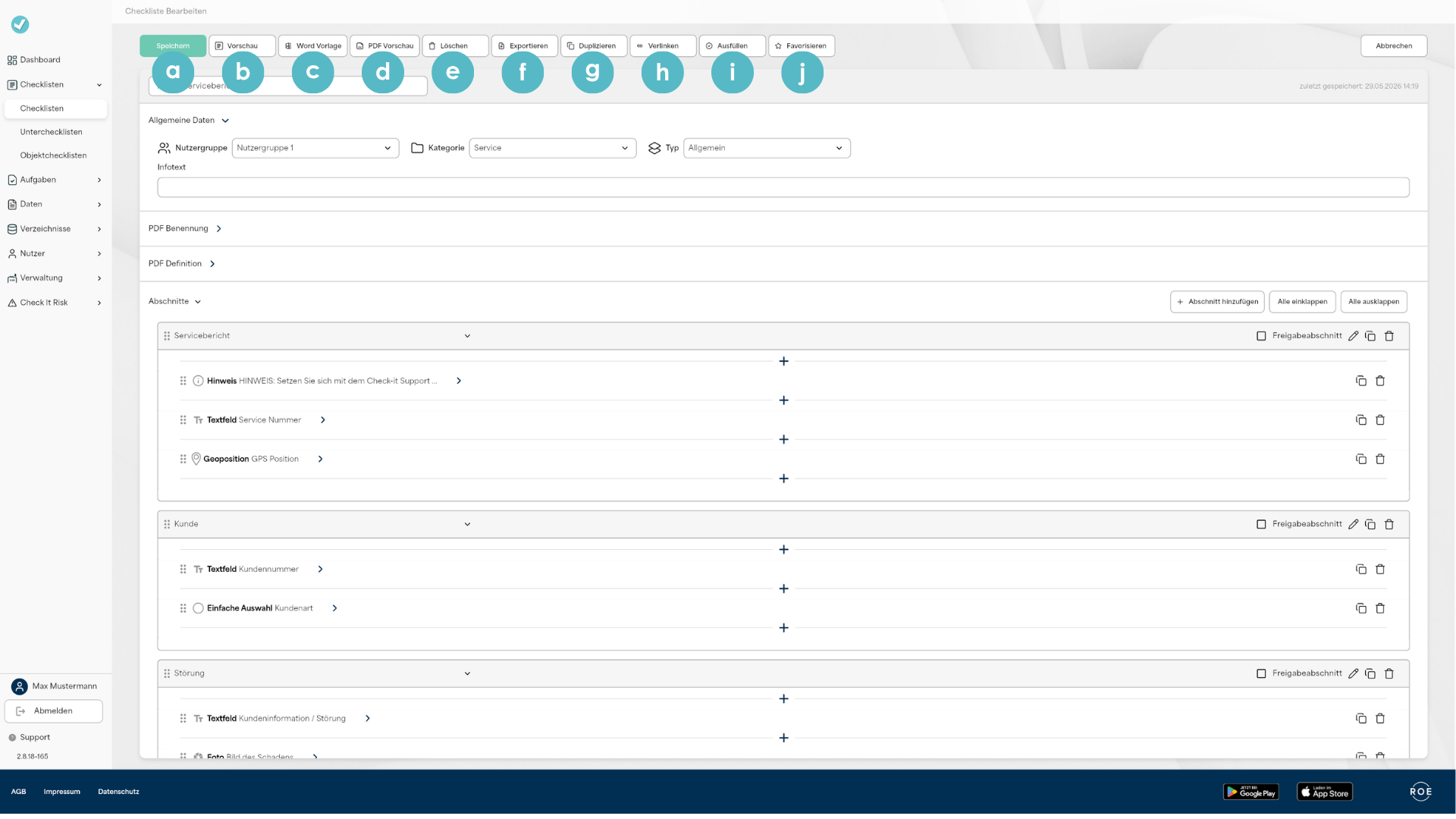
- Project area
- Field Operations
- Built for
- Inspection, field-service, and operations teams
- Technology
The field-to-server handover
- Reusable checklists define how inspections, maintenance, and documentation should be carried out
- Work orders add the responsible user or group, timing, location, and object to each concrete job
- Field work can continue offline, then return to the backoffice after connectivity is restored
- Objects, master data, documents, and follow-up measures keep the field record connected to the wider operation
Check-it separates the reusable definition of a task from the job assigned to a person. A checklist states what has to be inspected or documented; an order adds who should do it, when, where, and for which object.
The user receives that order in the mobile app, completes the checklist with photos, comments, or signatures, and sends the result back to the server. The same record can then become a report, a follow-up measure, or input for an existing business system.
BasalBit used Flutter across Check-it's mobile and browser application experience. Shared product logic supports the field and backoffice workflows, while each interface is adapted to its screen, input method, and role.
Product screens
Offline work with a deliberate sync
The mobile app is designed for work away from reliable coverage. When it is open and online, Check-it periodically exchanges data with the server. Users can also start a manual synchronization after a long offline period or a larger set of backoffice changes.
During a manual synchronization, the app pauses checklist completion. That gives the transfer a clear boundary instead of letting field edits and server updates overlap.
- Open Synchronization from the app's navigation menu
- Start the transfer when the device is back online
- Follow the percentage, sections sent, and last synchronization time
- Return to checklist work after the synchronization is complete
For users, this turns offline support into a simple operating sequence they can repeat without guessing what the app is doing.
A synchronization users can understand
The synchronization screen uses plain operational feedback: start the transfer, see the percentage, see which sections have been sent, and check the time of the last successful synchronization.
It also names the data being synchronized: online-assigned checklists, categories, and documents. Users can tell what the app is moving and when it is safe to continue.
The field-to-backoffice journey
The product connects reusable configuration with a concrete field assignment:
The checklist remains the maintained definition of the work, while each order carries its own operational context and result.
- Configure: build the checklist with required fields, logic, reference data, and the intended report output
- Assign: turn it into an order for a user or group, with timing, location, and object information
- Execute: complete the work in the mobile app, including offline, and capture the required evidence
- Continue: synchronize the result, generate the report, and route findings into follow-up measures or connected systems
When image transfers are interrupted
Image evidence has its own recovery path inside the synchronization menu.
- Check all images verifies that every image was downloaded correctly and restarts missing downloads
- Send all images resends image files when an interrupted synchronization left the server without them
- Both actions are available from the synchronization screen, so the user can repair the transfer without rebuilding the checklist
That is a small but important product detail: interrupted connectivity has a named recovery action, not just an error state.
What users can do
- Build reusable checklists with required fields, conditional sub-checklists, and centrally maintained linked copies
- Turn a checklist into a scheduled order for a user or group, a location, and an object
- Complete work offline on a phone or tablet and capture photos, comments, signatures, and other evidence
- Retrieve vehicle, machine, customer, or other master data by reference number or barcode
- Create follow-up measures with an owner, due date, status, images, comments, and documents
- Produce configurable PDF or Word reports and connect existing systems through the API
The backoffice around the field work
The backoffice supplies the field user with more than a blank form. It controls the work definition, the reference data around it, who can access it, and what happens to the result.
- Orders connect a reusable checklist to a user or group, timing, location, object, and completion status
- Hierarchical objects organise buildings, floors, rooms, equipment, or other assets and expose their properties inside the checklist
- Reference tables fill known master data from a unique number or 1D/2D barcode instead of asking the user to retype it
- Measures carry findings forward with a responsible person, due date, status, images, comments, and documents until closure
- Configurable PDF and Word output supports reporting standards, while the OAuth2 REST API connects orders and results to ERP, maintenance, database, or document-management systems
Categories, content types, and user groups keep each department focused on the checklists and documents it needs, while shared content can still be distributed across the organisation.
Where this workflow matters
This operating model applies anywhere a field record has to survive weak connectivity and return as structured evidence:
- Recurring maintenance and inspection rounds
- Safety checks, permits, qualifications, and test protocols
- Asset, equipment, building, and facility documentation
- Work that combines photos, signatures, PDF records, and follow-up tasks
The value is practical: the user can finish the work where it happens, understand the transfer, and recover missing image exchanges without starting over.
Our contribution
BasalBit contributed directly to the development of ROE Check-it.
- Web and mobile checklist workflows
- Backoffice configuration and user-facing synchronization
- Offline field data capture and local persistence
- Photo, signature, PDF, and image-transfer recovery workflows
- API integration and operational follow-up
Our work connected configurable backoffice processes with a mobile app built for everyday field conditions.
The resulting platform covers the full loop from assigned checklist to offline execution, synchronization, evidence, and follow-up work.
Project context & sources
ROE Check-it is a product of R.O.E. GmbH. BasalBit contributed directly to the product, connecting web administration, mobile field work, offline execution, evidence capture, and downstream workflows.
- https://roe-gmbh.com/check-it/
- https://roe-check-it.de/
- https://roe-gmbh.com/check-it/funktionen/ (features page)
- https://roe-gmbh.com/check-it/add-ons/
- https://support.checkitapp.de/online-tutorials/
- https://support.checkitapp.de/tutorial/
- https://support.checkitapp.de/faq/
- https://support.checkitapp.de/app-sync/
- https://support.checkitapp.de/check-it-api/
- https://apps.apple.com/de/app/check-it/id1534128511
- https://play.google.com/store/apps/details?id=de.roegmbh.checkit